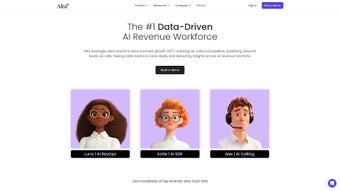

Download Alta – AI‑Driven Business Insights, Revenue Optimization, Real‑Time Analytics
Overview – Why Alta Is Becoming the Go‑to Observability Platform for Revenue Teams
In today’s data‑centric economy, revenue teams can no longer rely on static reports or manual spreadsheets to stay ahead of market shifts. Alta answers that need with an AI‑powered business observability platform that turns raw data into actionable insight in real time. By connecting directly to the tools you already trust—Salesforce, HubSpot, Stripe, Tableau, Google Analytics, and more—Alta aggregates every revenue‑related event, normalizes it, and surfaces the patterns that matter most.
The platform’s built‑in metrics library offers customizable templates that follow industry best practices, allowing teams to visualize funnels, churn, lifetime value, and other critical KPIs without building dashboards from scratch. What truly sets Alta apart is its AI assistant, Alta Copilot. This digital colleague watches your data 24/7 and pushes instant, context‑rich notifications via Slack, email, or SMS whenever a revenue signal crosses a threshold.
Whether you’re a growth hacker, a CFO, or a sales ops manager, Alta gives you the confidence to act quickly, collaborate seamlessly, and protect your revenue engine from unexpected dips. Security‑first enterprises also appreciate that Alta adheres to SOC 2 compliance, encrypts data in transit and at rest, and offers granular permission controls. In short, Alta combines the reliability of a traditional BI suite with the agility of modern AI, making it a compelling choice for any organization that wants to turn data into a competitive advantage.
The platform’s cloud‑native architecture ensures you always have the latest features without manual updates, and its pay‑as‑you‑grow pricing model aligns cost with value, so you can scale as your business expands.
Core Features & AI Copilot – A Deep Dive into Alta’s Toolkit
- Universal Data Connectors: Native integrations with Salesforce, HubSpot, Stripe, Tableau, Google Analytics, and over 150 other SaaS apps. Real‑time sync ensures you never miss a transaction.
- Metrics Library & Templates: Pre‑built revenue‑focused KPI templates (MRR, ARR, churn, CAC, LTV) that can be customized to match your business model.
- Alta Copilot AI Assistant: Machine‑learning engine that monitors metric trends, detects anomalies, and delivers push notifications via Slack, email, or SMS with suggested actions.
- Collaboration Hub: Shared workspaces, comment threads, and role‑based access let cross‑functional teams align on revenue goals without switching tools.
- Advanced Visualization: Drag‑and‑drop dashboards, heat‑maps, and funnel visualizers that turn complex data sets into clear, executive‑ready stories.
- Enterprise‑Grade Security: SOC 2 compliance, ISO‑27001 alignment, end‑to‑end encryption, and audit logs for full governance.
- Automation & Alerts: Rule‑based triggers that can invoke webhooks, update CRM records, or start marketing campaigns automatically when a KPI moves.
- Mobile‑First Experience: Responsive web app plus native iOS and Android companions so you can monitor revenue health on the go.
The synergy between these features creates a single pane of glass for revenue intelligence. For example, a sudden dip in monthly recurring revenue (MRR) will be instantly flagged by Alta Copilot, which then sends a Slack alert with a root‑cause hypothesis—perhaps a churn spike in a specific segment. The sales ops manager can click the alert, drill into the funnel visualization, and even launch a targeted win‑back email sequence directly from the platform. This closed‑loop workflow eliminates the latency that traditionally plagues revenue teams and empowers decision‑makers to act before the problem escalates. Additionally, Alta’s API lets developers embed visualizations into internal portals or trigger custom workflows, extending the platform’s value far beyond out‑of‑the‑box dashboards.
Installation, Usage & Compatibility – Getting Started with Alta in Minutes
Because Alta is a cloud‑native SaaS solution, there is no traditional “install” process on a local machine. Getting up and running is as simple as creating an account, linking your data sources, and configuring your first dashboard. Follow these steps for a smooth onboarding experience:
- Sign Up for a Free Trial: Visit the official Alta website, click “Start Free Trial,” and provide your business email. No credit card is required for the 14‑day trial.
- Connect Data Sources: From the “Integrations” tab, select the apps you use (e.g., Salesforce, Stripe). Authenticate using OAuth; Alta will pull historical data and set up a continuous sync.
- Choose a Metrics Template: Browse the Metrics Library, pick a template that matches your revenue model, and map the required fields to your data sources.
- Configure Alta Copilot Alerts: Define thresholds (e.g., MRR drop > 5 %) and select notification channels—Slack, email, or SMS.
- Invite Team Members: Assign roles (Viewer, Analyst, Admin) and invite collaborators via email. Permissions can be fine‑tuned per dashboard or data source.
- Launch Your First Dashboard: Use the drag‑and‑drop builder to arrange charts, set date ranges, and apply filters. Save and share the view with stakeholders.
Supported Platforms: Alta runs entirely in the browser, making it compatible with Windows 10+, macOS 10.14+, Linux, Chrome, Edge, Safari, and Firefox. For mobile access, native iOS (13+) and Android (8+) apps are available through the App Store and Google Play respectively.
The platform also offers an API and webhooks for developers who need custom integrations or want to embed Alta visualizations into internal portals. Because all communication is encrypted via TLS 1.3 and data at rest is stored using AES‑256, you can trust that your revenue data remains secure whether you’re accessing it from a corporate laptop or a personal tablet. If you prefer an on‑premise data bridge, Alta provides a lightweight gateway that creates an encrypted tunnel to the cloud, ensuring compliance with strict data‑ residency policies.
Pros, Cons, FAQ & Conclusion – Should You Download Alta Today?
Pros
- Real‑time AI insights that reduce reaction time to revenue changes.
- Extensive library of pre‑built revenue metrics and templates.
- Seamless integrations with major SaaS platforms, minimizing data silos.
- Enterprise‑grade security and SOC 2 compliance.
- Collaboration tools that keep all stakeholders on the same page.
- Responsive design and native mobile apps for on‑the‑go monitoring.
Cons
- Subscription pricing may be high for very small startups (< 10 users).
- Initial setup of complex data mappings can require a short learning curve.
- Advanced automation rules are only available on the Professional tier.
- Limited offline access – requires internet connectivity for all features.
Frequently Asked Questions
What types of businesses benefit most from Alta?
SaaS companies, subscription‑based services, e‑commerce platforms, and any organization with recurring revenue models gain the most value, as Alta’s metrics and AI are tuned for revenue‑centric KPIs.
Is there a free version or trial available?
Yes. Alta offers a 14‑day free trial with full feature access. No credit card is required, and you can cancel anytime before the trial ends.
How does Alta ensure data privacy and security?
Alta is SOC 2 Type II compliant, encrypts data in transit with TLS 1.3, stores data at rest using AES‑256, and provides role‑based access controls and detailed audit logs.
Can Alta integrate with on‑premise databases?
Yes. Using Alta’s secure connector framework, you can bridge on‑premise SQL or PostgreSQL databases via a lightweight gateway that maintains encrypted tunnels to the cloud.
What support options are available for new users?
Alta provides 24/7 email support, a live chat widget for paid plans, an extensive knowledge base, and quarterly onboarding webinars to help teams get the most out of the platform.
Conclusion – Take the Next Step Toward Revenue Confidence
If your organization is serious about turning data into predictable growth, Alta delivers a compelling blend of AI insight, seamless integration, and enterprise‑grade security—all wrapped in a user‑friendly interface. The platform’s ability to push actionable notifications directly to the tools your team already uses eliminates the lag between discovery and action, giving you a decisive edge in a competitive market. While the subscription cost may be a consideration for very small teams, the ROI realized through reduced churn, faster upsell cycles, and smarter allocation of marketing spend often outweighs the price tag. Ready to experience revenue observability in real time? Download Alta today, start your free trial, and let the AI Copilot guide you toward a more profitable future.
Overall Rating: 4.5/5 – Robust AI‑driven insights, excellent integrations, and strong security make Alta a top choice for revenue teams.



.png)



